
Toyota Camry (XV70): System Diagram
Toyota Camry Repair Manual XV70 (2018-2024) / Engine, Hybrid System / 2gr-fks (engine Control) / Ignition System / System Diagram
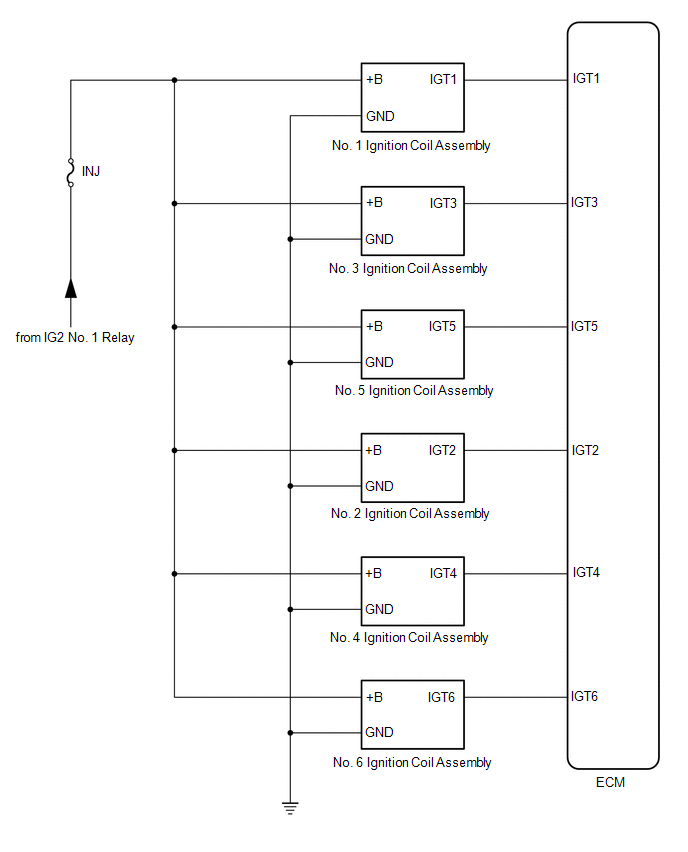
SYSTEM DIAGRAM
READ NEXT:
 On-vehicle Inspection
ON-VEHICLE INSPECTION CAUTION / NOTICE / HINT
CAUTION: To prevent injury due to contact with an operating V-ribbed belt or cooling fan, keep your hands and clothing away from the V-ribbed belt and c
Components
COMPONENTS ILLUSTRATION
*1 KNOCK CONTROL SENSOR (for Bank 1)
*2 KNOCK CONTROL SENSOR (for Bank 2)
N*m (kgf*cm, ft.*lbf): Specified torque
* For use with a un
SEE MORE:
Parking Brake System(w/ Electric Parking Brake System)
PrecautionPRECAUTION
NOTICE:
If the battery is connected, the parking brake will operate when the electric parking brake switch assembly is pulled to the lock side even if the engine switch is off. Do not operate the electric parking brake switch assembly with the battery connected unless spec
Right Rear Wheel Speed Sensor Circuit Short to Battery (C051212)
DESCRIPTION Each speed sensor detects wheel speed and sends signals to the skid control ECU (brake actuator assembly). These signals are used by the ABS control.
The speed sensor detects the magnetic fields of the speed sensor rotor as it rotates and outputs a pulse signal.
The frequency of the
© 2023-2026 Copyright www.tocamry.com
